
You typed three words into a box, pressed a button, and got a song that could be about anyone. Clean, well sung, and completely empty. The machine isn't the problem: it did exactly what it was asked to do, which wasn't much.
Writing a song with AI doesn't mean handing the song over. It means giving the AI the jobs it does better than you (rhyming, composing, singing) and keeping the ones it will never manage. Here is the method, step by step, the way we use it in the Tubissime Studio.
What the AI does, and what stays with you
Let's split the work honestly. The AI handles rhyme, metre, structure, melody, instruments, vocals and the mix. It does it fast, and it doesn't sulk when you ask for a fourth attempt.
What stays with you comes down to three things: the story, the cut and the final say. The story, because no engine knows your brother learned to swim at 34. The cut, because a song only holds four or five ideas. The final say, because only you can tell whether a line sounds like the person or like a greetings card. What happens under the bonnet is explained in how an AI personalised song actually works.
The AI writes fast. Only you know whether it's true.
Start from a story, not a prompt
The instinct is to write an instruction: "happy pop song for Sophie's birthday". You'll get a happy pop song for a Sophie. Not yours.
Start by telling the story instead, as you would to someone who has never met her. In the Studio's Assistant tab, Mélodie, the writing assistant, asks you questions and drafts the lyrics from your answers. If typing slows you down, voice dictation writes while you talk: plenty of people tell a story far better than they write one. What to give her:
- A detail nobody else knows: the nickname, the habit, the catchphrase.
- One precise moment, with a place and a date: "the campsite in Cornwall, August 2019, the tent that blew away at three in the morning".
- The thing you've never said to their face. It's often the chorus.
- The style they listen to. Not necessarily yours.
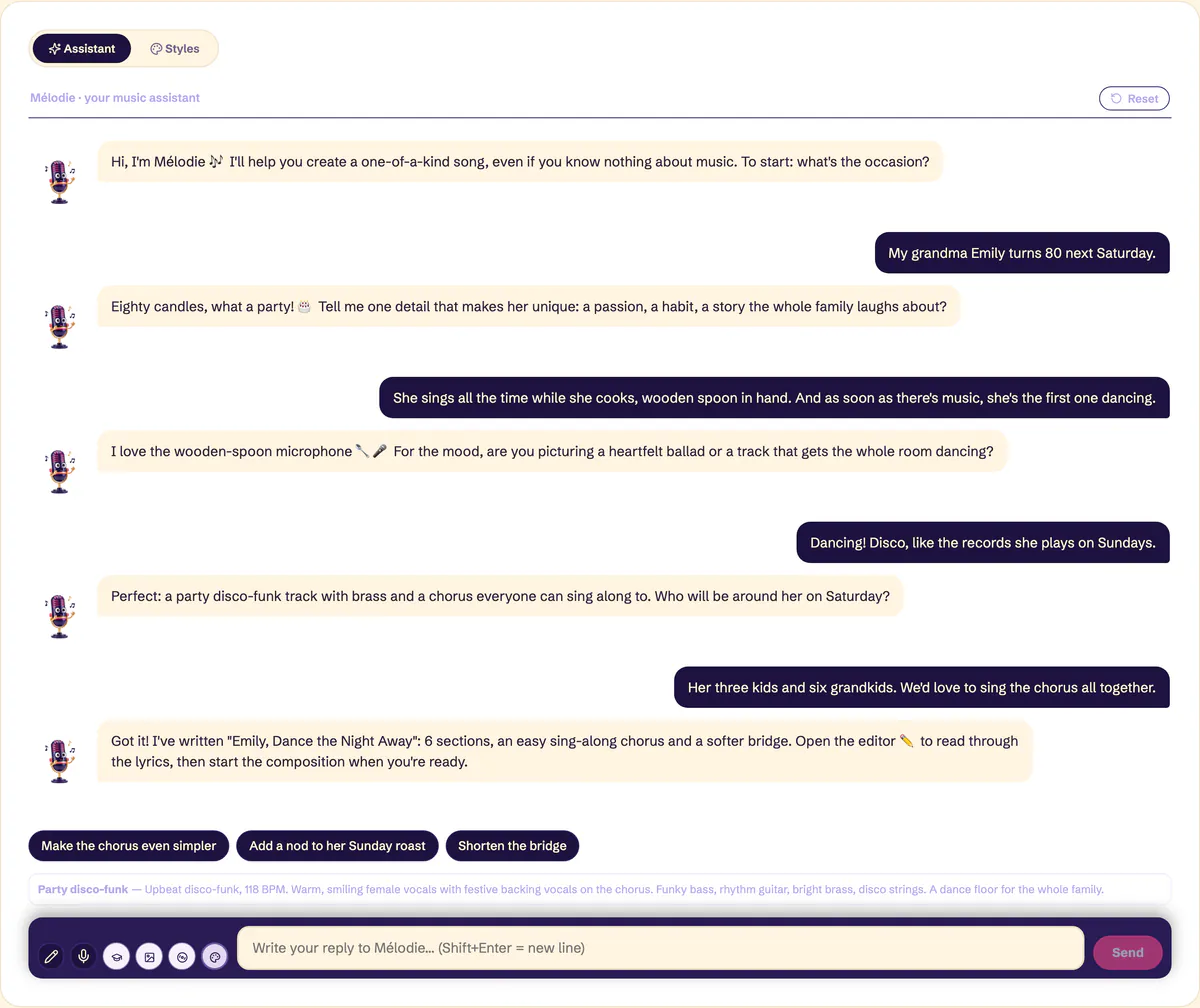
Prefer to set the frame yourself? Guided mode walks you through a form: occasion, first name, style, then lyrics written automatically, written by you, or an instrumental. And Free prompt is there for people who can already describe a track in a single instruction.
Review the lyrics section by section
When the lyrics arrive, don't read them in one go. Read them the way they'll be sung: verse by verse, chorus on its own. In the editor, every section is a separate block, with its own lyrics, musical directions and length. You name them as you like: "Campsite verse" will mean more to you than "Verse 2".
Three questions per section. Does this verse say one specific thing? Does the chorus stand up on its own, without the verses? Does any line sound wrong coming from the person giving the song? If so, ask Mélodie in plain English: "rework verse 2, mention the tent", "make the chorus a duet". She redoes that section, not the whole song. The writing coach, meanwhile, suggests richer rhymes and a steadier rhythm without touching what you're saying.
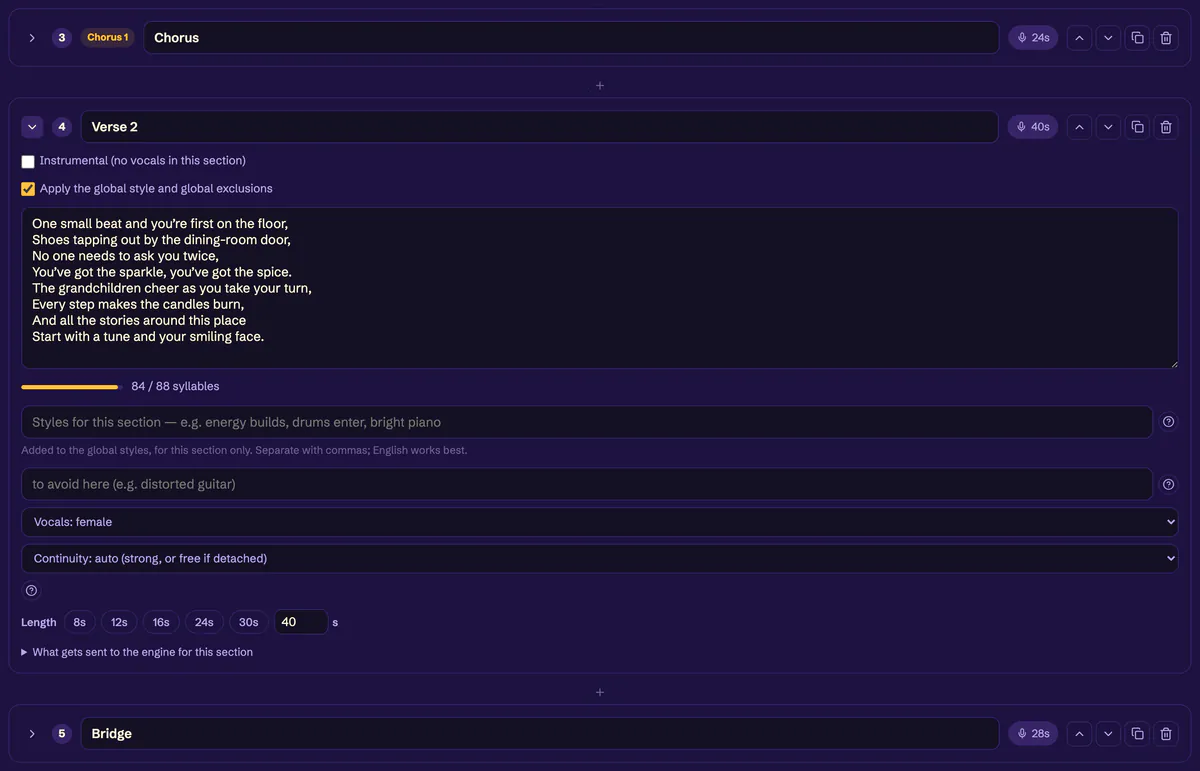
How many verses to plan, where the bridge goes, how long each block should last: it's all in song structure, block by block.
Choose the voice and the length
The voice is set section by section: male, female or duet. One verse in a male voice, the next in a female voice, the last chorus as a duet, and the song tells the story of two people instead of one. In the same view you list styles to follow and styles to avoid ("no saxophone", say), and you can open a preview of exactly what goes to the music engine. No black box.
As for length, the Studio runs from 10 seconds to 5 minutes, and each section lasts between 3 and 120 seconds. Mélodie suggests 3 minutes at most, which is enough for most gifts; to go up to 5, use Guided mode. Don't aim long on principle: a well-filled 2 minutes 30 moves people more than 5 minutes of the same chorus on repeat.
Fix it without starting again
Not keen on a verse once you hear it sung? Redo that verse alone. Only the sections you rework are recomposed, the rest of the song keeps the same voice, and the original version is kept: if the new take is worse, you've lost nothing. That's the whole difference with a tool where every correction regenerates the entire song, with a different voice and a different tempo.
Once you've found the sound, keep it. The style library stores up to 50 personal styles, and the Styles tab lets you build new ones with Riff: you name a reference, he describes its sound. Your next song starts where the last one left off.
The mistakes that make a song generic
- Accepting the first draft without reading it. It's fine, which is exactly why it's generic.
- Cramming everything into one verse. One idea per section, or nothing comes through.
- Writing a chorus that tells the story. The chorus sums up, the verses tell.
- Picking 5 minutes to make it feel like "more". Longer just means more room to get bored.
- Redoing the whole song for one line. Rework the section, keep the rest.
What it costs, honestly
The Studio runs on credits. You get 30 free credits when you sign up: enough to write lyrics with Mélodie and try out the tools, not enough to compose a song. Music is paid by length: one minute costs 42 credits, a cover 51. For a 2 min 30 song, allow a little over 100 credits. Packs go from 60 credits for €3.90 to 500 credits for €24.90, and credits never expire.
Two things to know before you start. A rework is charged on the full length of the song, not just the section you redo: it buys you a consistent voice and time, not cheaper credits. And the amount is always shown before anything is deducted: nothing is taken until you've seen it and confirmed. To put these numbers next to a musician or a gift plan, see how much a custom song costs.

Frequently asked questions
Do I need to be good at writing to make a song with AI?
No. You tell the story, Mélodie turns it into rhymes and structure. What matters is how precise your memories are, not your prose: "he sings out of tune in the car" beats a pretty, vague sentence. The writing coach takes care of the rest.
Can I write my own lyrics?
Yes. In Guided mode, choose manual lyrics and paste your text, or edit it section by section in the editor. You can also start from Mélodie's lyrics and rewrite part of them: the music is then composed on your words.
What can I do with the 30 free credits?
Write lyrics with Mélodie and get to grips with the Studio: tabs, sections, voices, preview. They aren't enough to compose a song, since one minute of music costs 42 credits. The amount for each composition is shown before it's deducted.
What if I just want to give someone a song, without setting anything up?
Then the Studio isn't the shortest route. The gift plans do everything for you at a fixed price, no account needed: you tell the story, and the song is composed in a few minutes, in two versions.
The takeaway
Writing a song with AI is a division of labour: it rhymes, composes and sings, you bring the story, make the cuts and have the final say. Start from one precise memory, review section by section, set the voice and the length, and fix what's off without redoing everything. Listen to a full demo of the finished result first, then create your Studio account to write yours.